> For the complete documentation index, see [llms.txt](https://community.commandersact.com/customer-success/llms.txt). Markdown versions of documentation pages are available by appending `.md` to page URLs; this page is available as [Markdown](https://community.commandersact.com/customer-success/expand-your-uses/audience-and-activation/smart-re-engagement-via-the-last-product-viewed.md).
# Smart re-engagement via the last product viewed
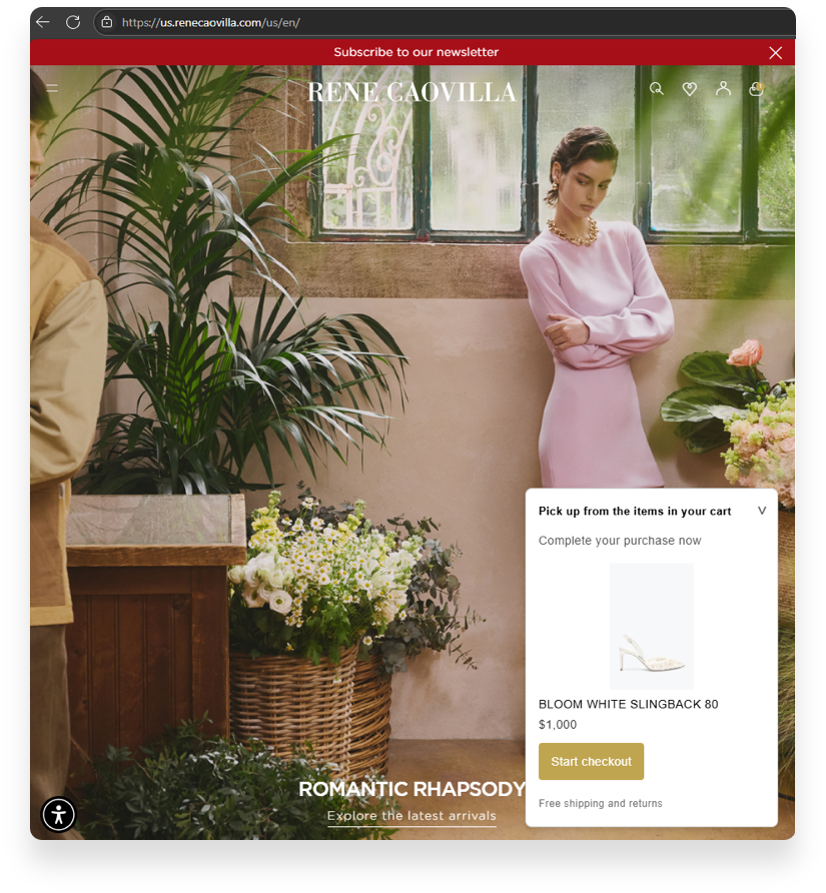
Re-engage your visitors by displaying the last product or quote they viewed when they return. Use these real-time signals of intent to facilitate conversion without disrupting navigation.
### **1. Business value: Guarantee actionable and certified data**
Using CDP allows you to go beyond the limitations of session cookies to offer persistent, cross-device personalisation.
* **Increased relevance (UX):** Stop treating your loyal customers like strangers. The CDP recognises users when they return, and the TMS instantly displays content that truly interests them.
* **Conversion optimisation**: Dynamically reminding users of past interests reduces decision time and guides them towards finalising their choice (+20% click-through rate on contextual reminders).
* **Unified first-party data**: You capitalise on an internally certified browsing history rather than relying on third-party solutions subject to browser restrictions.
### 2. Implementation methodology
#### **Step A: Collecting intent signals (TMS)**
Use OneTag to capture the details of the product viewed (ID, image, name) and send them in real time to the CDP.
#### **Step B: Profile storage and persistence (CDP)**
The CDP stores the last product viewed as a user profile attribute. This allows the information to be retained even if the user changes browsers or returns several days later.
#### **Step C: Personalisation activation (TMS/On-Site)**
The TMS queries the CDP when the page loads to retrieve the last product viewed and triggers a personalised pop-in or banner.
#### **Step D: Arbitration and exit scenarios**
Define rules to avoid being intrusive (e.g. do not display the reminder if the product has been purchased in the meantime or if the user is already in the conversion funnel).
### 3. Typical use cases
1. **Retail (CDP/TMS synergy):** A visitor views a television on their mobile phone. Two days later, when they return to their computer, the TMS displays the following on the home page: ‘Still interested in the \[TV model]? Continue your exploration’.
2. **Banking & Insurance:** Re-display the last credit simulator used or the last auto quote generated as soon as the user accesses the ‘Individuals’ section of your site.
3. **B2B / Services:** Offer to continue reading a white paper or specific case study that the user had started to view during a previous session.
### Need help making your data flows more reliable?
The CDP + TMS alliance is the driving force behind your real-time personalisation. Our experts will assist you in configuring your profile attributes and display scenarios for maximum efficiency. **Contact our support team:**